PR · GSTR-2B Reconciliation
Invoice-wise matching engine • High-precision 5-Pass GST Engine
- Upload one multi-sheet workbook per side, not category by category. Your GSTR-2 (Books) file and your GSTR-2B (Portal) file should each contain all their category sheets (B2B, CDNR, CDNUR, IMPG, IMPGSEZ, SEZ, etc.) together — the tool auto-detects every sheet and reconciles each category on its own.
- Multi-Rate / Multi-Item Consolidation is Active. Invoices itemized across multiple tax slabs (e.g. 5% and 18%) are automatically consolidated by GSTIN + Invoice Number, preventing false duplicate flags and tax under-counting.
- High-Precision 5-Pass Pipeline. Matches exact invoice numbers, prefix/FY-stripped cores, numeric suffixes, proximity dates ($\pm 60$ days), and flags Place of Supply (IGST vs. CGST/SGST) tax-head mismatches.
- Matching Tolerance is set to ₹10 by default (taxable value and tax). You can adjust it below.
- Encountered an error? Please write to us at cagyaansadhna@gmail.com and we will assist you promptly.
0Taxpayer Details
These details appear on every exported report — Summary sheet, PDF, JSON and CSV.
services.gst.gov.in in a new tab — nothing is fetched or transmitted automatically by this tool.0bReconciliation Scope & Mode
Annual Mode: upload one consolidated GSTR-2 (Books) and GSTR-2B (Portal) workbook covering the whole financial year, exactly as before.
1GSTR-2 Report (Books)
Upload your full software-generated GSTR-2 report — all sheets (B2B, CDNR, IMPG, etc.) are read automatically
2GSTR-2B Report (Portal)
Upload the full GST Portal GSTR-2B file — all sheets (B2B, B2B-CDNR, IMPG, etc.) are read automatically
3Diagnostics Panel
Live reconciliation summary for the selected category — hover any tile for details
4Side-by-side Comparison
Invoice-level match results with full detail columns
No reconciliation run yet
Upload the Purchase Register and GSTR-2B files above, then click Run Reconciliation to generate the invoice-wise side-by-side comparison.
⚠️ Disclaimer
This tool, PR · GSTR-2B Reconciliation, is developed and maintained by CA Gyaan Sadhna Team for informational and professional assistance purposes only.
- No legal or tax advice. Output does not constitute professional tax, legal, or financial advice. Always verify with a qualified CA or tax professional before filing.
- Accuracy & 5-Pass Engine. Matches invoices using a 5-pass precision engine: exact number, prefix-stripped core, numeric suffix, value/date proximity, and cross-GSTIN match. Always review flagged items (especially Place of Supply / Tax Head mismatches & Rule 37A ITC Reversal Risk).
- User responsibility. Accuracy depends entirely on the quality and completeness of the data you upload. CA Gyaan Sadhna Team shall not be liable for any errors, omissions, or losses arising from use, including data lost by closing the browser tab before downloading a report.
- No warranty. Provided "as is" without any express or implied warranty of fitness for a particular purpose.
- Regulatory changes. GST rules are subject to change. Please verify all outputs against current applicable law.
Queries: cagyaansadhna@gmail.com
🔒 Privacy Policy
Your privacy is important to us. This policy explains how CA Gyaan Sadhna Team handles data when you use this tool.
- 100% local, in-browser processing. Every file you upload — GSTR-2, GSTR-2B, in any mode (Annual or Month-Wise) — is parsed and reconciled entirely inside your own browser tab, using JavaScript running on your device. No invoice data, GSTIN numbers, taxpayer details, tax values, or file contents are ever transmitted to our servers or to any third party.
- No personal details required. You do not need to provide an email address, mobile number, or any other personal information to use this tool or download a report. Nothing is collected for lead capture, marketing, or record-keeping.
- Nothing is stored anywhere — not even on your device. Uploaded files and reconciliation results exist only in this browser tab's memory for the duration of your session. They are not written to browser storage, a database, or any server. Closing the tab or refreshing the page erases everything.
- No cookies or tracking. This tool sets no cookies and runs no analytics or tracking scripts. External CDN scripts (SheetJS, ExcelJS, jsPDF) are loaded only to provide file-processing and display functionality, not for tracking.
- Questions or concerns? Contact us at cagyaansadhna@gmail.com.
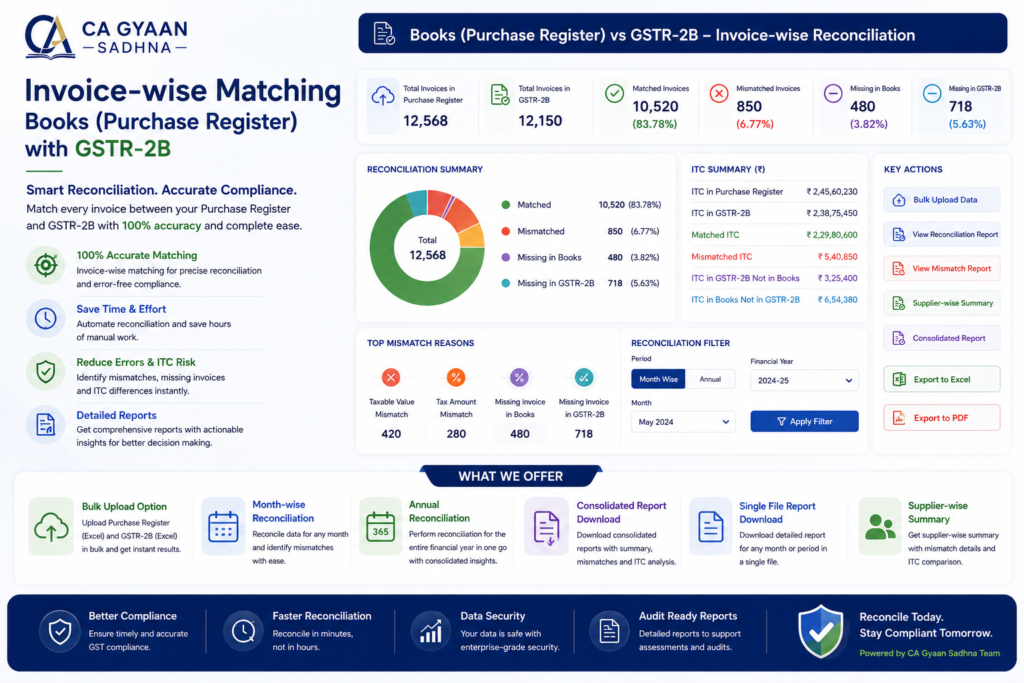
Reconciling your Purchase Register with GSTR-2B is essential for claiming accurate input tax credit and avoiding GST notices. Our free reconciliation tool matches your invoices line by line, instantly flagging mismatches, missing entries, and discrepancies — so you can fix them before filing your GST returns.
How the GSTR-2B Reconciliation Tool Works
Upload your Purchase Register and GSTR-2B data, and the tool automatically compares them invoice-wise — checking supplier GSTIN, invoice number, invoice date, and tax amounts. Any mismatches, missing invoices, or amount differences are highlighted clearly, so you know exactly which entries need follow-up with your suppliers. You can cross-check your original GSTR-2B statement anytime on the official GST Portal before running your GSTR-2B reconciliation here.
“Manual GSTR-2B reconciliation is time-consuming and error-prone, especially when you’re handling dozens of invoices every month.”
“Our GSTR-2B reconciliation tool removes this manual effort by matching entries automatically.”
“Whether you reconcile GSTR-2B weekly, monthly, or before each filing deadline, consistency is what protects your input tax credit.”
Why Invoice-Wise Reconciliation Matters
Claiming input tax credit on invoices that don’t appear in GSTR-2B can lead to ITC reversal, interest, and penalties under GST law. Regular invoice-wise reconciliation — ideally every month — helps you catch supplier filing delays early, follow up in time, and ensure you claim only the ITC you’re actually eligible for.
Useful Link
Frequently Asked Questions (FAQs)
1. What is GSTR-2B?
GSTR-2B is an auto-generated, static statement that shows the Input Tax Credit (ITC) available to a taxpayer based on invoices uploaded by their suppliers. It is generated monthly by the GST portal and does not change once issued for that period.
2. What is GSTR-2B reconciliation and why is it needed?
GSTR-2B reconciliation means matching your own Purchase Register with the GSTR-2B data to confirm that the ITC you plan to claim is actually reflected in the government’s records. Without reconciliation, businesses risk claiming excess ITC (leading to penalties) or missing eligible ITC (leading to cash flow loss).
3. What is invoice-wise reconciliation?
Invoice-wise reconciliation compares each individual invoice in your Purchase Register against the corresponding invoice in GSTR-2B — checking invoice number, GSTIN, taxable value, and tax amount — rather than just comparing totals. This catches mismatches that a summary-level check would miss.
4. What files do I need to use this tool?
You need two files:
- Your Purchase Register (exported from Tally, Excel, or your accounting software)
- Your GSTR-2B data (downloaded from the GST portal for the relevant tax period)
5. What format should my files be in?
[Fill in based on your actual tool — e.g., “Excel (.xlsx) format with columns for GSTIN, Invoice Number, Invoice Date, Taxable Value, and Tax Amount.”]
6. Is my data safe when I use this tool?
Yes. The reconciliation happens directly in your browser/session and your files are not stored or shared. [Adjust this based on how your tool actually processes data — only state what’s true.]
7. What common mismatches does this tool identify?
- Invoices present in your Purchase Register but missing in GSTR-2B (supplier hasn’t filed yet)
- Invoices present in GSTR-2B but missing in your Purchase Register (you may have missed booking a purchase)
- Value or tax amount mismatches on invoices that exist in both
8. What should I do if an invoice is missing from GSTR-2B?
This usually means your supplier hasn’t filed their GSTR-1 for that period, or filed it late. You should follow up with the supplier, since you can only claim ITC once the invoice reflects in your GSTR-2B.
9. Is this tool free to use?
Yes, this GSTR-2B invoice-wise reconciliation tool is completely free to use, with no login or signup required.
10. How often should I reconcile GSTR-2B?
Ideally every month, before filing GSTR-3B, so you claim the correct ITC amount and avoid future notices or reversals with interest.
11. Can I download the reconciled report and monthly consolidation in Excel?
Yes, once the reconciliation is complete, you can download the matched, unmatched, and mismatched invoice details as an Excel file. This makes it easy to maintain monthly records, share with your accountant, or use as supporting documentation during GST audits or ITC claims.